
Cloud Device FAQ
Keyboard stuck, default US IP, models, no Apple ID, region and time zone, no live streaming. What people ask before and after they start.
No network on the Cloud Device?
The default is the facility US dedicated line. It works when you start. You do not have to add a proxy first.
To change the exit, configure SK5 on the device. You bring the nodes. We do not sell proxy lines. See Device network.
Proxy check fails?
You configured the node, port, and account. Confirm SK5 connects on the device, then check whether the exit IP is the one you expected. A wrong node, a dead node, or a failed auth all look like “no network”.
Stuttering video, high input delay?
Mirroring uses your PC’s downlink. Drop resolution, keep only a few HD streams, then decide if local bandwidth is the limit. Cross-border delay is noticeable; batch taps still work. Shared steps: Mirroring stutter and devices dropping.
What happens at expiry?
If you don’t renew at 30 days, the device stops and leaves the operable list. Renew and it comes back. No auto-charge.
Can I group-control it with Home Device?
Yes. After start they share one list. Group by project and operate the group.
Where are app cloning and data cleanup?
Those live on Home Device. Cloud Device is ready-to-use hardware plus the US line, and it can sit in the same group. See Home vs Cloud.
Keyboard won’t type?
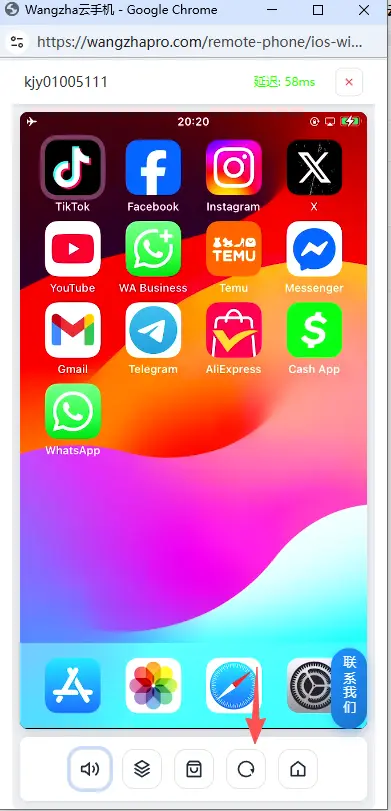
Usually the IME is stuck. Tap Restart at the bottom of the mirror window, then try again. Don’t reinstall keyboards.
What IP does it ship with?
A Cloud Device started by scan or activation code gets a dedicated US facility IP. It has network when you start. No proxy required first.
To change the exit, buy a node and set SK5. See Device network. We do not sell proxies. For long-running accounts most people use SOCKS5 residential nodes with UDP. Which vendor is your choice.
Which models and iOS versions?
Mainly iPhone 8, SE, SE2, and SE3. iOS 17 or 18 in most cases. Assigned at start; you cannot pick a specific unit.
Can I sign in to Apple ID / the App Store?
No. Cloud Device does not accept your Apple ID. Install from the app market; ask sales if an app is missing. See How to install apps.
Region, language, time zone?
All in Settings → General. Change region and language, Change the time zone. Match region to the current exit IP.
Jailbroken? One-tap new phone?
Stock iOS, not jailbroken. No one-tap reset. Sign out of the app and uninstall it when you switch accounts. Cloud Device also cannot factory-reset.
GPS? Live streaming?
GPS stays off and cannot be changed. Turning location on is often treated as abnormal. Cloud Device cannot use the camera or microphone, so it cannot go live.
White screen on the app or in the window?
Try Ctrl + Shift + R. If it stays white, send the device id to support.
