How synced group control works
Focus is live view of one phone. Sync follows the master. Select a group, paste only after the browser allows clipboard access.
Group control is not “tap twenty screens at once”. It is: you operate one master; selected devices follow.
Home Device and Cloud Device both support it, and they can share a group. The console has two modes. Know which one you are in.
Focus vs sync
- Focus: live view of one phone. You operate that phone only. Nothing syncs to the others. Switch it from the top-right of the device list.
- Sync: select phones and they follow. Open 操作同步 on the left. The picture refreshes per device. Use it for batch taps, swipes, and typing.
Install apps or change settings on many phones with sync. Debug one phone with focus.
Basic flow
- In the list or a project, select the phones to operate together.
- Pick one master. Swipe, tap, and type on the master.
- The selection follows. Uncheck any time to work on a single phone.
Twenty devices or two hundred: your action count is the same. The real limit is your PC downlink and the browser. No hard cap.
Use groups
Keep devices in a project or purpose group. Select the whole group for control or dispatch.
Home Device and Cloud Device can sit in the same group. Drop a newly started Cloud Device into the group that’s already running.
Filter the list by group at the top. Change the group on the right. Build the group first, then select the whole group for sync or dispatch.
Mirroring without melting the PC
The picture is WebRTC, not timed screenshots. Resolution and orientation are adjustable.
Don’t run every phone at HD. HD only the ones you’re watching; drop the rest or close unused views. If it stutters: Mirroring stutter and devices dropping.
With cloning and cleanup
Cloud Device is ready-to-use hardware plus the US line. App cloning and account-switch cleanup live on Home Device. In a mixed group those two only apply to Home Device.
Scripts will become drag-and-drop later. See How scripts will ship. Today, batch actions stay on synced control.
Paste into a Cloud Device
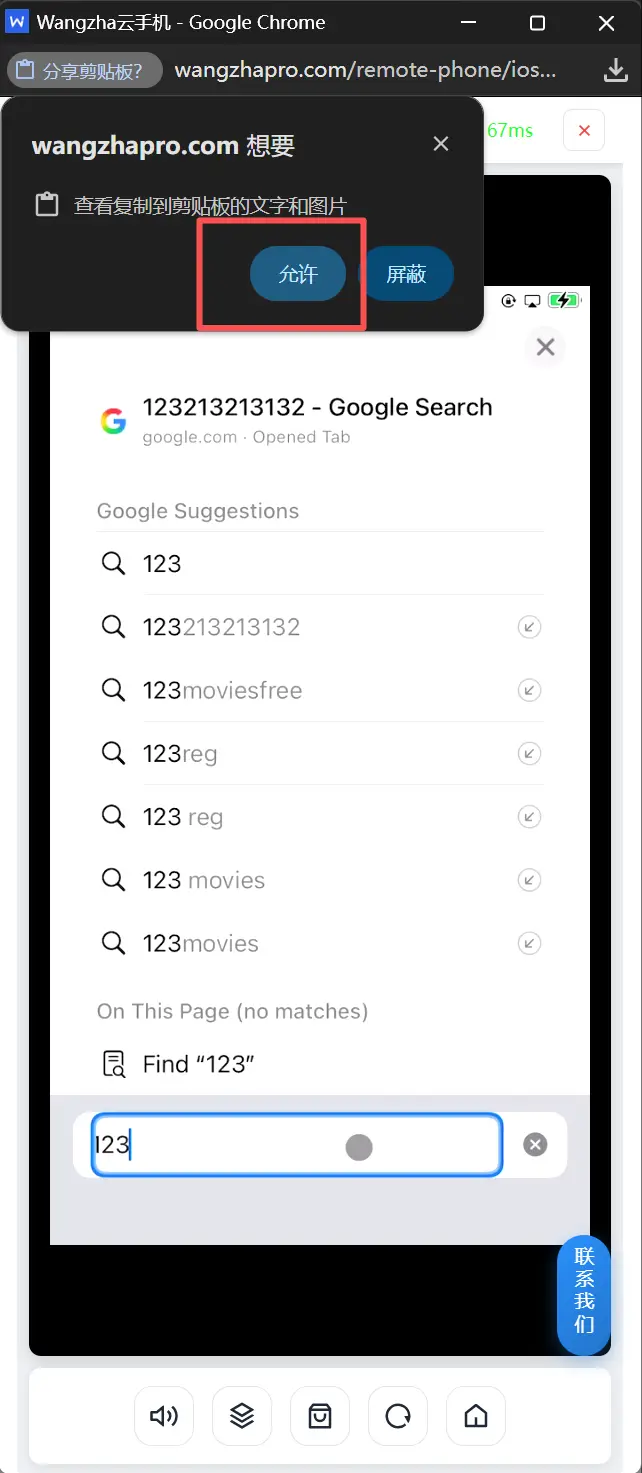
After you copy on the computer, the browser asks to read the clipboard. Click Allow, or the text never reaches the phone. Block means paste fails.